Mokkup.ai11 min read
Designing a wireframing tool for people who don't wireframe
- Role
- Founding Design Lead
- Company
- Mokkup.ai
- Timeline
- 2022 – present
- Team
- Lead 2 UI/UX designers, working with the frontend, backend and AI teams
- Owned
- Design direction, strategy and marketing
Summary
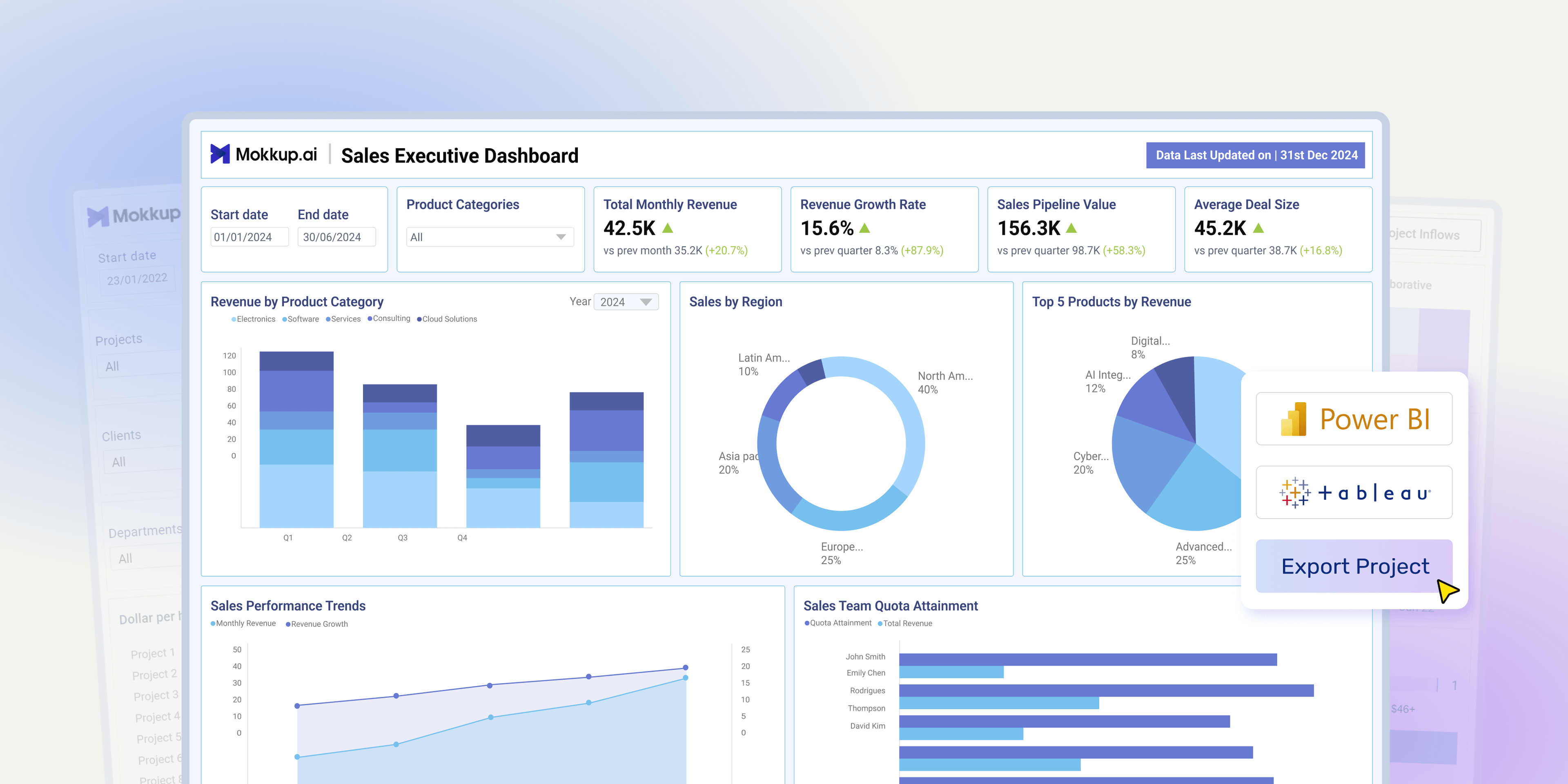
I helped build Mokkup from an idea into a dashboard wireframing tool used by 250K+ users. The challenge was bigger than making dashboards easier to design: the tool had to work for people who weren't designers and produce wireframes that could translate reliably into Power BI and Tableau. I shaped the product around those constraints, made export to Power BI and Tableau central to the workflow, and built systems that let the team make complex design and feasibility decisions independently.
- 250K+
- users
- 15,000+
- organizations
- 600K+
- exports
The two days that started this
At NeenOpal, Mokkup's parent company and a provider of data and analytics services, I planned client dashboards and kept running into the same problem: feedback arrived only after development. The client would review the finished dashboard, request changes, and the developer would rebuild it. Across the hundred or so dashboards I worked on between 2020 and 2022, each round cost three to five man-days.
One e-commerce client missed a window to optimize their marketing campaigns because their dashboard sat in that loop. The marketing team's requirements hadn't been translated properly into business logic, so the figures came back wrong. The developers took a week to fix them, and the campaigns went untargeted. The cost was measured in revenue, not development hours.
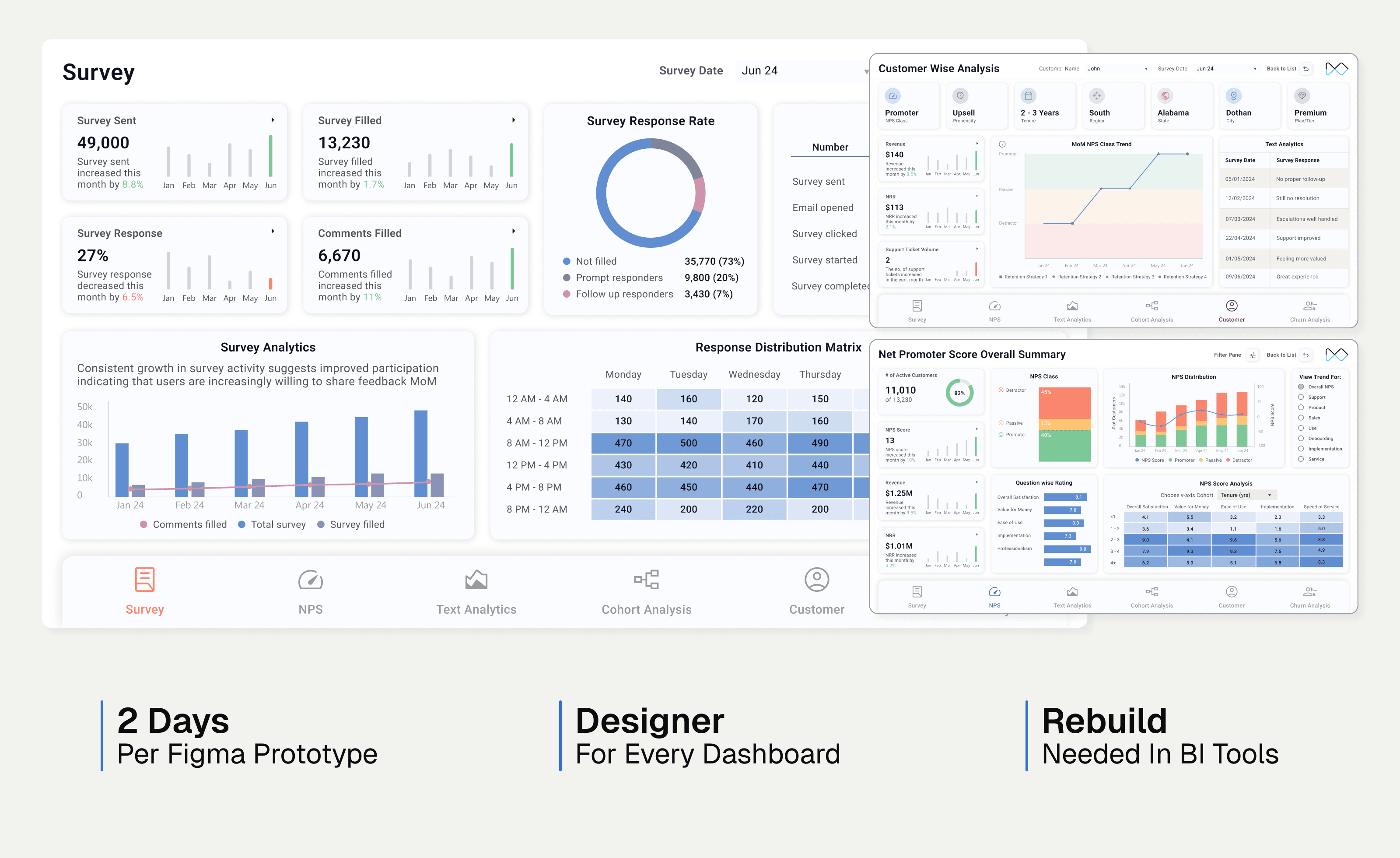
I proposed adding a step before development: wireframing the dashboard first. I took it on myself and built clickable prototypes in Figma. Each one took at least two days because I had to understand the business, learn what each metric meant, and decide how to represent it.
Why this process still failed
The wireframes worked. Clients could finally see what they were asking for, and the feedback loop closed. But new problems arose.
The process depended heavily on a designer who understood data structures, data models and, more importantly, how business intelligence tools worked. In practice, that was me. Tools like Figma, Miro and Balsamiq assumed users wanted to design. Our developers were BI developers and data analysts: technically sophisticated, spatially competent, and entirely uninterested in learning a design tool.
More decisively, anything built in Figma still couldn't be replicated exactly in Power BI or Tableau. The wireframe and the dashboard had diverged by the time development began.
That brought about the idea of Mokkup in 2022: a tool that let data analysts and developers wireframe dashboards without needing a designer in the loop.
What I own for Mokkup: then vs now
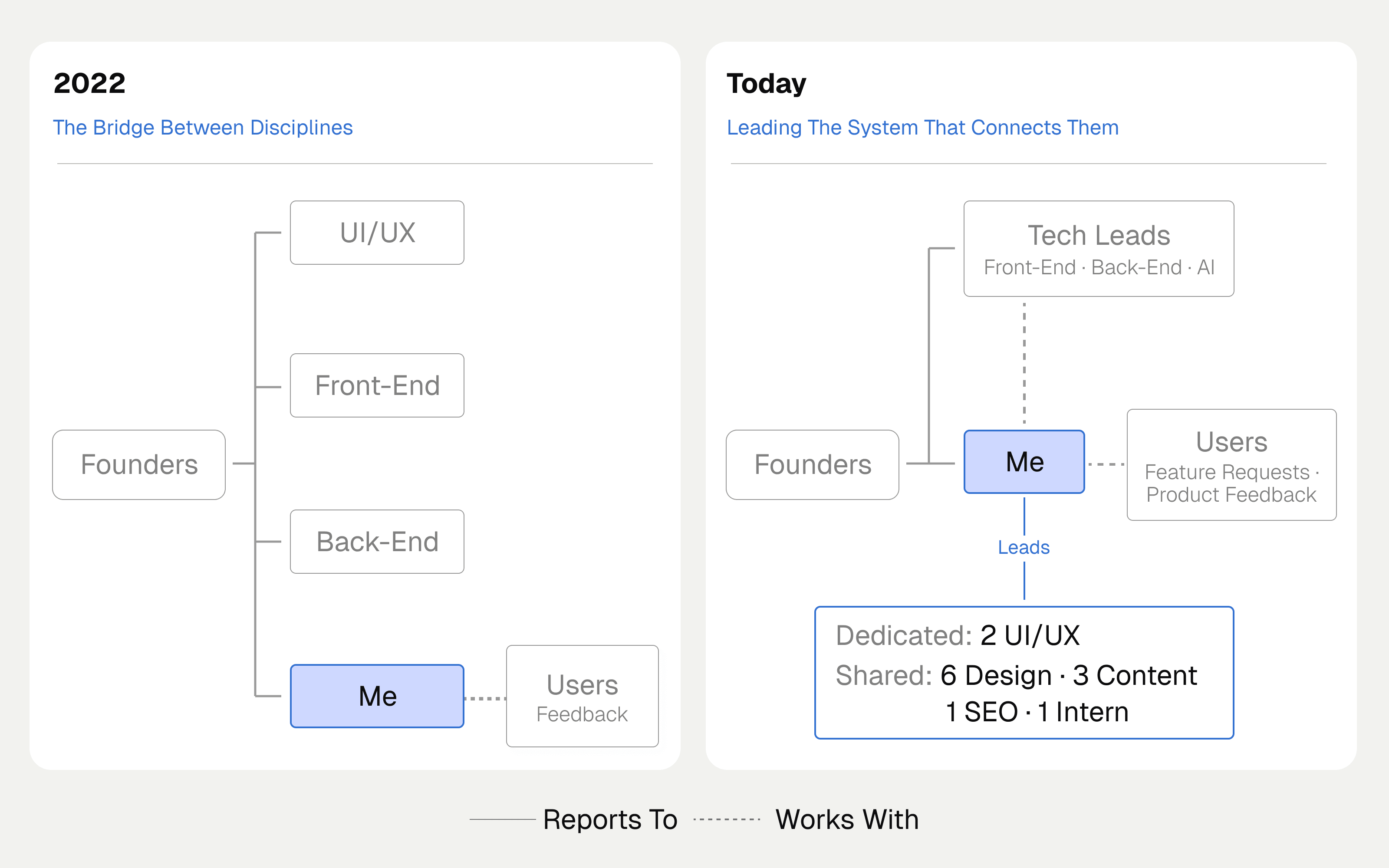
I've been on Mokkup since the concept was first discussed with NeenOpal's senior management. At the start, we were four: a UI/UX designer, a frontend developer, a backend developer, and me as the bridge between design, development, and the dashboard developers who would use it.
Today, I'm the primary contact for feature additions, growth opportunities, and customer feedback. My job is coherence: making product intent, technical reality, brand voice and business outcomes agree. I work with the frontend and backend leads to scope feasibility, set timelines and priorities, and keep the product true to what we began with.
The team around the product has grown with it. Two senior UI/UX designers report to me and own the core flows and systems, while I lead the wider team responsible for marketing and content.
Moving the domain knowledge out of my head
At the start, I was the only person on the team who understood both design and BI: how a Power BI report page is structured, why a visual behaves differently from a card, and what a data model change actually costs a developer. Every element decision was routed through me, which made me the bottleneck the product was built to remove.
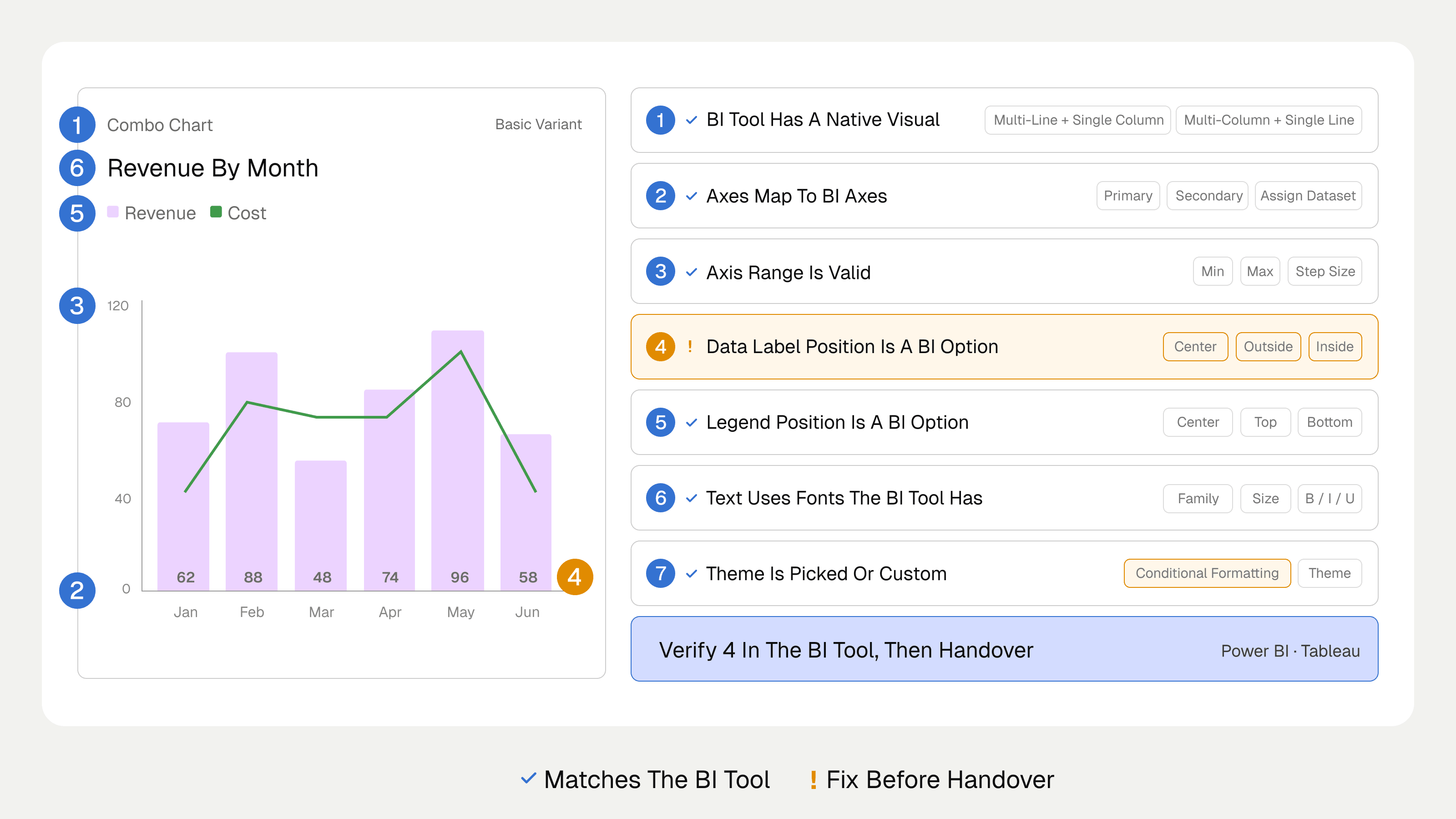
So I documented what I knew. I wrote a checklist of settings to look out for, and ran sessions with the designers, the frontend team and the dashboard developers so we all understood the destination tool.
It started with one element that shipped with minimal input from me. Now that's the norm. My team maps fidelity from Mokkup to the BI tools, plans the journey for each user, and works with the frontend team to build it. I guide when needed, but the designers on Mokkup today evaluate export feasibility themselves.
How I learned what to build
NeenOpal was the natural starting point because its team already built dashboards every day and knew what worked and what didn't. I also asked NeenOpal's clients where the current process broke down.
Just after the idea took shape, we ran a survey and followed it with interviews with senior developers on the team and with some clients. Across about 200 people, from inside NeenOpal and its external clients, four patterns came back and shaped the MVP:
- received stakeholder feedback only after the dashboard was built
- ~70%
- worked from primitive inputs like Excel sheets, PowerPoint or verbal direction
- ~87%
- had tried Figma or Miro and found them too complex to learn
- ~65%
- needed a designer to replicate design-tool wireframes in BI tools
- ~95%
Every developer depended on a designer, which meant two people were tagged to every project at all times. We narrowed the findings down to three problems for Mokkup to solve: developers needed a tool they could learn quickly, an easy way to share work and get feedback, and a wireframe they could replicate directly in their BI tool.
The direction became clear: a tool developers could learn in minutes, build a first dashboard wireframe in about 30 minutes without design help, and carry straight into their BI tool.
We agreed with stakeholders to take a phased approach: start with an MVP, watch user feedback, and build features from there. We had plenty of ideas, but they weren't necessarily what users would find most important.
Three problems, three decisions for the MVP
These three problems have stayed at the center of the product's design since the first idea.
01. Design backward from BI tools
Solving the learning curve.
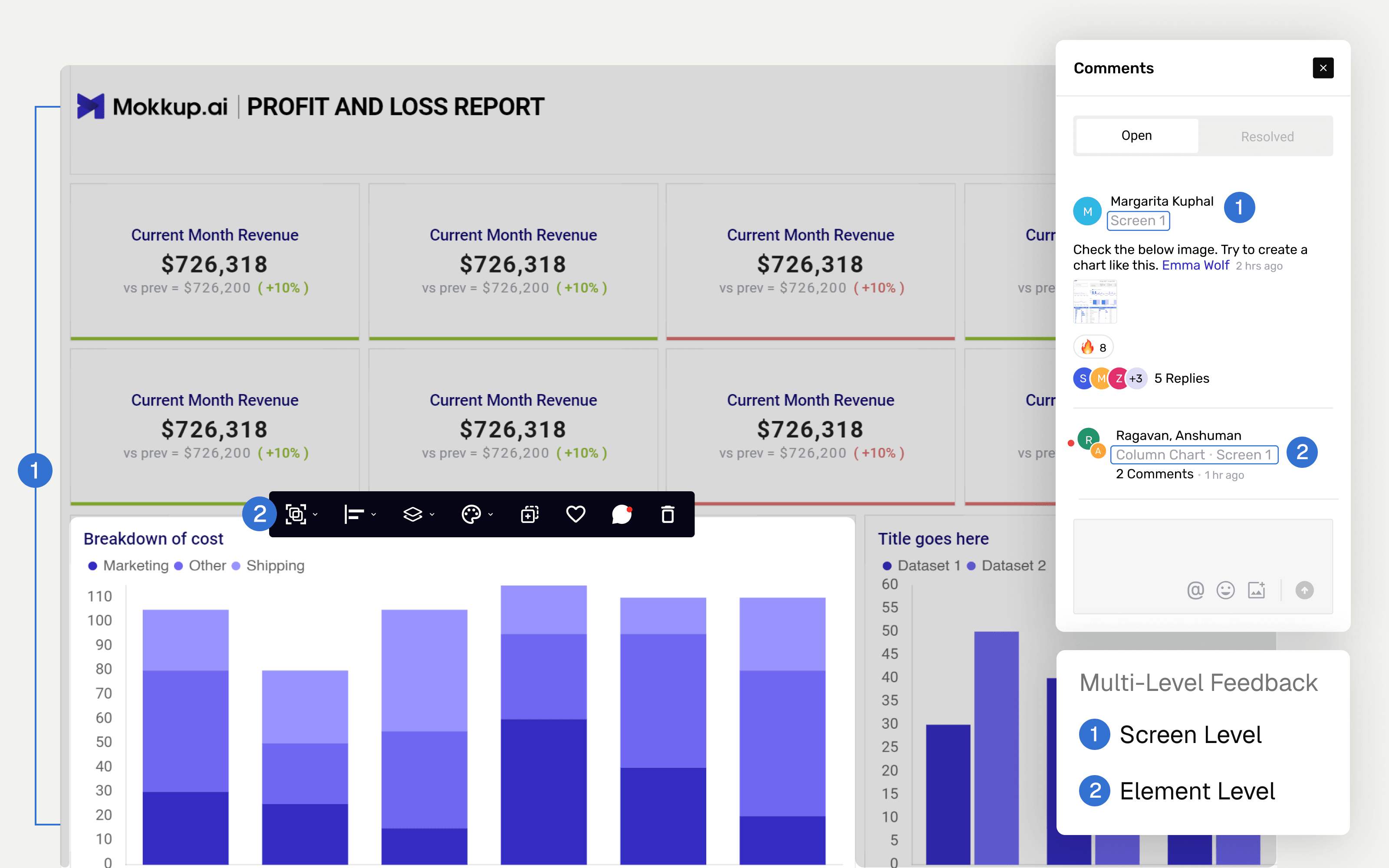
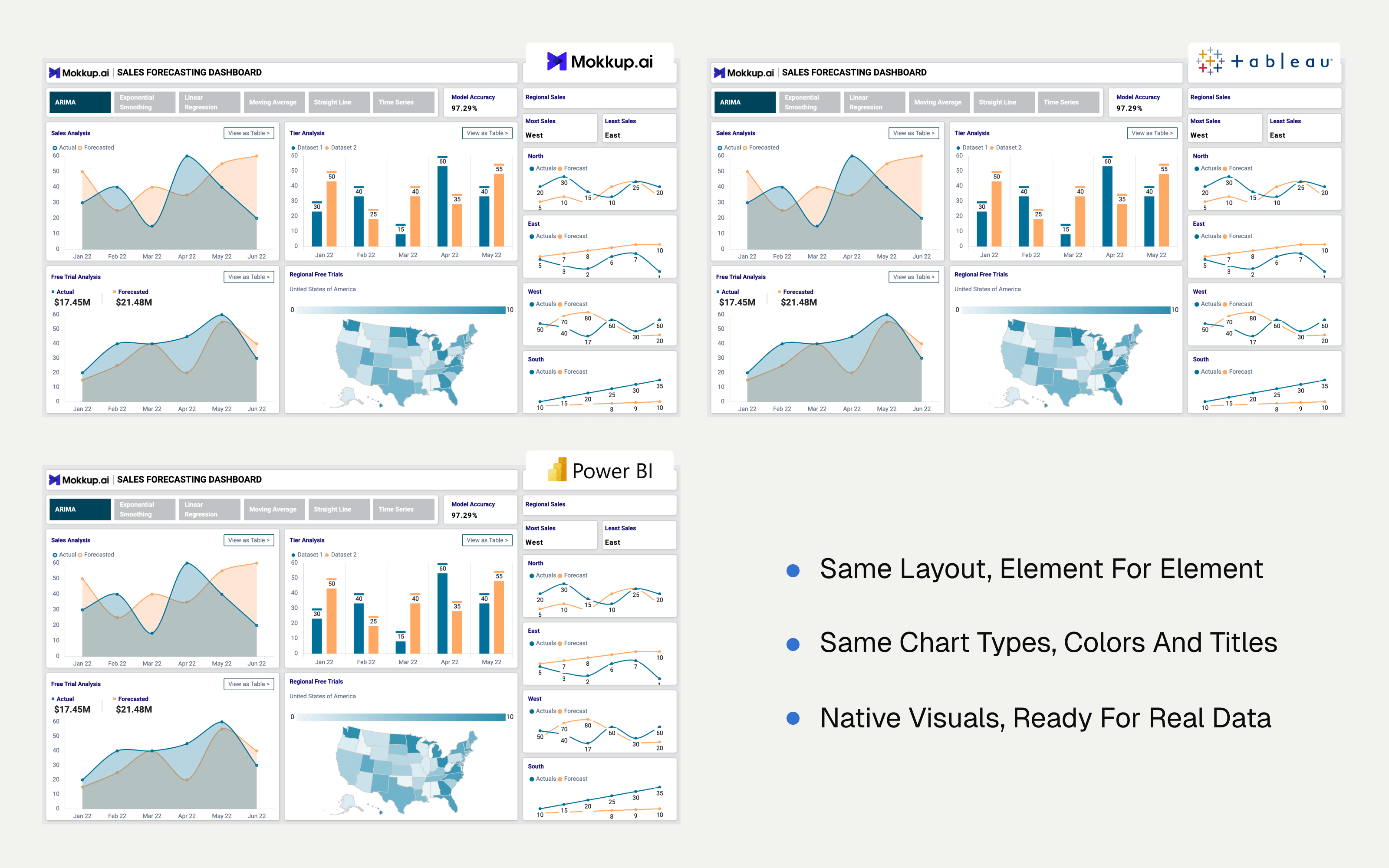
The constraint I brought to the founding team was an internal target: every element should reach roughly 98% visual fidelity in Power BI and Tableau. We built a framework around it before designing a single element, which meant designing for the destination tool rather than for our own canvas.
We tested each element with a proof of concept: build it, export it, and check whether it could actually be replicated in the BI tool, and how closely. In 2022, I collected every dashboard element we'd designed at NeenOpal into a repository, then reviewed it with Mokkup's developers and our data-visualization developers. We looked at what the MVP needed, what could wait, and what translated cleanly on export.
Elements that look good on our canvas but break on export don't ship.
The same logic drove the interface. I proposed building Mokkup's UI in the structural language of BI tools rather than design tools. Every developer we spoke to described friction picking up new software, and much of their time went into learning settings and interfaces rather than doing the work.
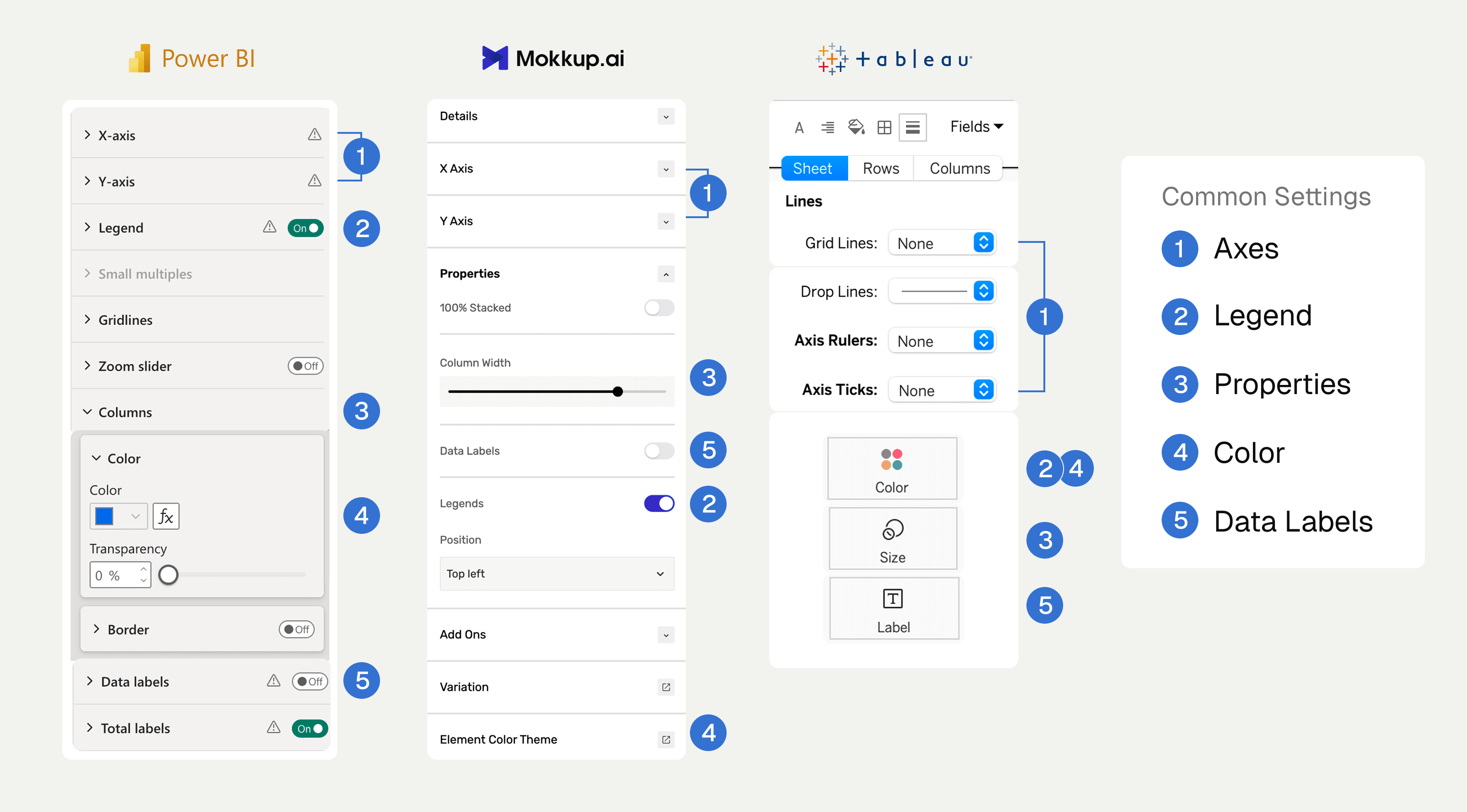
Each element was pre-designed so font, color and sizing stayed consistent without the user having to think about it. We kept each element to five to ten settings, enough for control without overwhelming users. Pre-loaded dummy data meant users could start immediately; a separate data tab made the distinction clear; and a hard cap on rows and columns reinforced that this was a wireframe, not the final product.
02. Feedback where the work is
Solving sharing and feedback.
One developer put the second problem better than our research did:
"We are never on the same page. We developers think one thing, the client assumes another, and the manager is thinking something completely different."
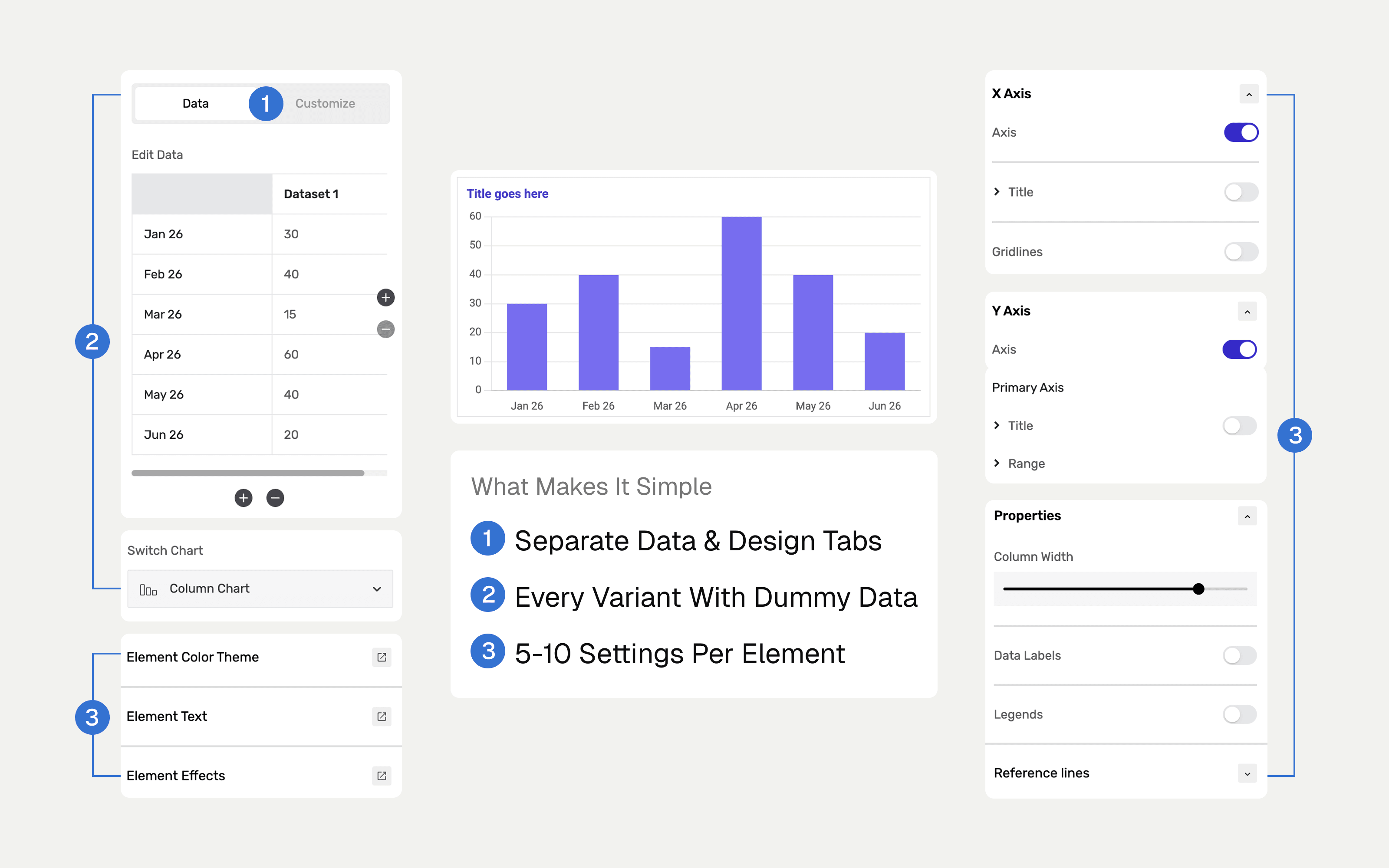
Wireframes only close a feedback loop if the feedback happens on the wireframe. Ours were still being discussed over email and in meetings, so the misalignment survived the artifact meant to prevent it.
I made a deliberate choice to stay conventional. Comments and collaboration are solved patterns, and inventing our own would have spent design time our users would have had to pay back in learning. We shipped comments nine months after MVP and live collaboration three months later.
I decided comments should work at both the element and screen levels. Users needed to discuss a specific metric's business logic as well as the dashboard's overall shape, and those are different conversations. Comment threads on Mokkup are now used to settle business logic for individual metrics, which is upstream of anything we designed for.
03. Building Mokkup's USP
Solving replicability.
Export to Power BI and Tableau is what sets Mokkup apart from general design tools. Export compatibility was designed into every element from day one, but the export feature itself took time to build. At MVP, we shipped tutorials for converting Mokkup wireframes into BI files instead. They weren't going to close the gap, so export shipped within six months of launch.
I didn't build the backend; that's proprietary, and I wasn't the architect. I set the fidelity standard it had to meet for data and design, and owned the output against that standard.
The design decision I made was where export lives. Users told us the tool saved time right up until they had to rebuild everything in Power BI. So when export shipped, rather than treating it as a feature to discover, I made it the default option, with an easy switch to something else for anyone who wanted it.
When export shipped, Mokkup had about 25K users. It now has 250K+, and in our product analytics, every user who builds a full dashboard screen exports it at least once. Export and ease of use are the reasons users most often give for choosing Mokkup.
Where I pushed back
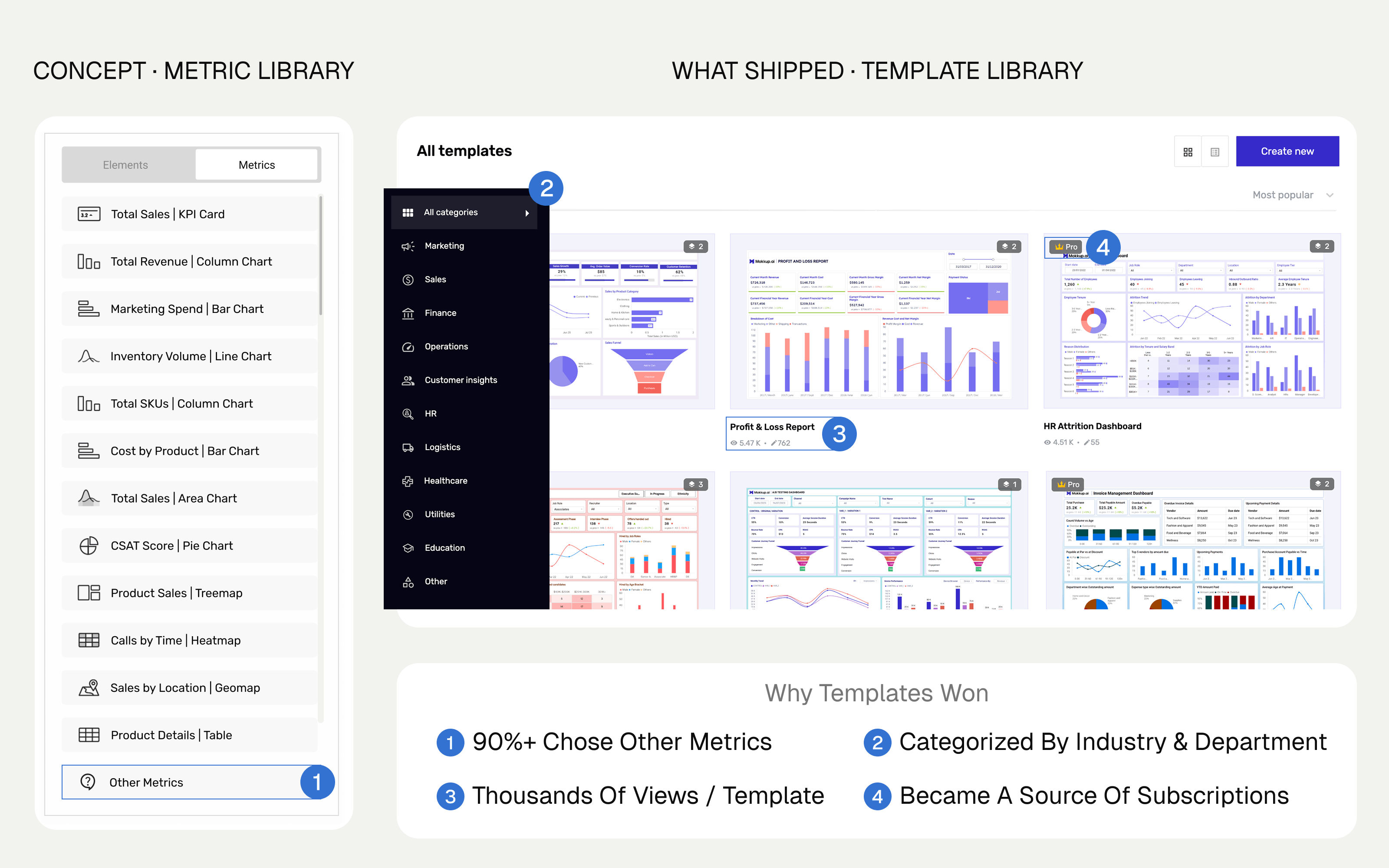
Some of the first flows stakeholders wanted for the MVP were a repository of metrics and important KPIs, so a developer could assemble a dashboard from components.
I tested it first with our own developers and analysts, and it didn't hold. Across industries and departments there were thousands of metrics, and in more than 90% of cases users selected "other" and typed their own. The repository was a menu nobody could finish reading.
I proposed replacing it with an editable template library, organized by industry and department and built on NeenOpal's BI expertise. I took the founders through the proposed flow and internal testing data: where users found the metric library complex, and how templates simplified it. They responded to it immediately.
The reversal cost us early build time. It was worth it. Templates became the fastest way for a new user to get started, and they also became an acquisition channel. We kept some templates free and made others Pro templates, which come with a subscription. Users could start with a free template, or subscribe for a Pro template they really wanted.
- templates in the library, and growing
- 1,200+
- new users a month arriving organically through template pages
- 1,600+
- of paying users subscribed to unlock a Pro template
- ~10%
The principle I got wrong
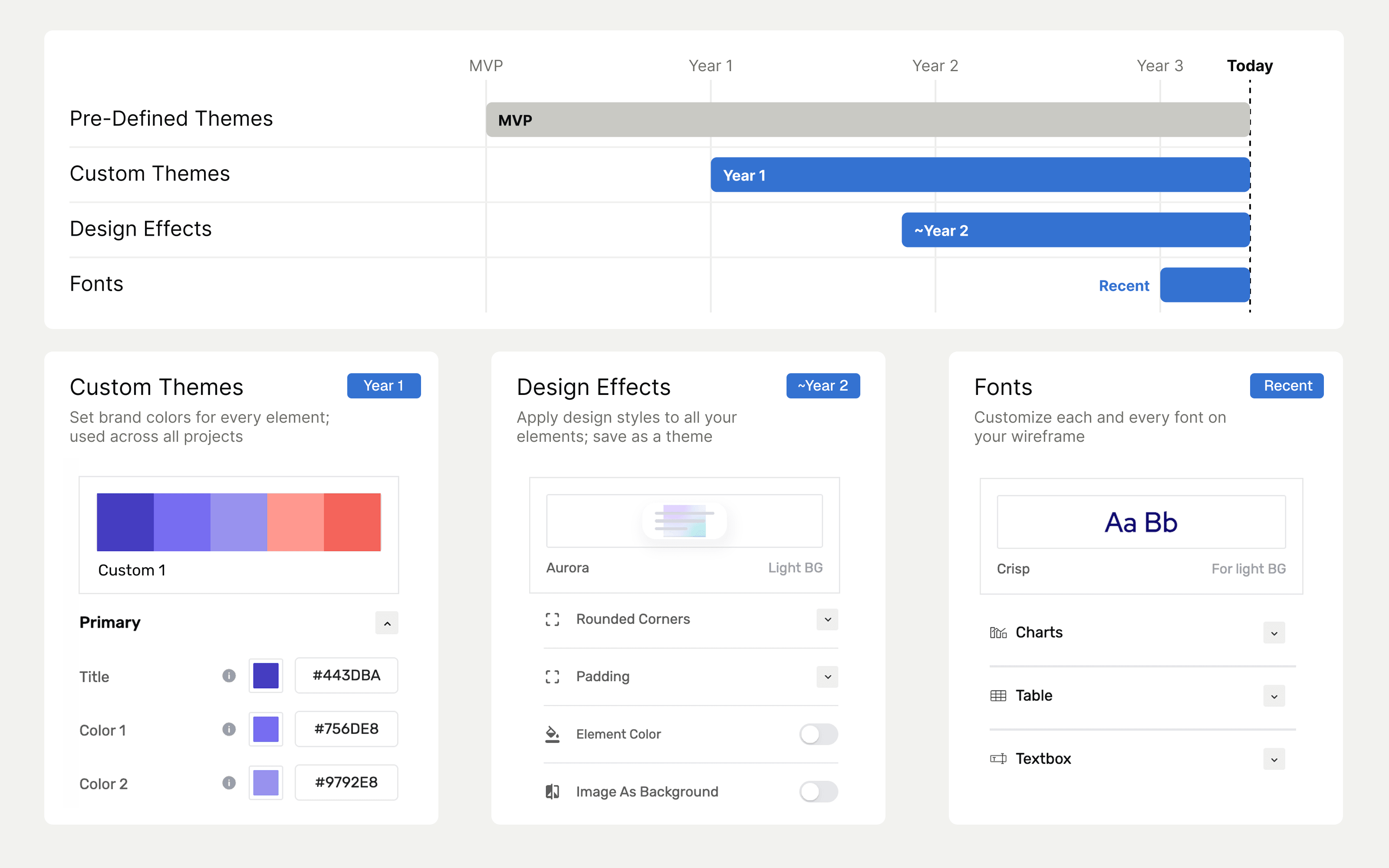
Restraint was the product's premise at the MVP stage. We built Mokkup for people who don't want to design, and every customization option raises the complexity floor for exactly that audience. So the MVP shipped deliberately narrow: data editing, simple text edits, element variations and add-ons, and a set of predefined themes. Design control was the thing I chose not to give.
Then users asked for it. Requests came from multiple teams and large enterprises that were paying customers. They wanted custom themes and design effects to match their brand: rounded corners, shadows and customizable fonts. The settings I'd judged least useful to them.
I was genuinely surprised, and I was wrong about the segmentation. We collated what users had asked for across three years of support tickets and in-app feedback, and shipped in phases:
- Custom themes shipped first, a year after the MVP, extending the predefined themes so users could create their own to match their brand.
- Design effects such as shadows, borders and canvas colors came almost two years in. About 50% of the users asking for custom themes asked for these too.
- Fonts are the most recent addition, letting users customize every font on the wireframe. We hadn't had many requests, but large enterprises were starting to ask.
We held these back to understand what users actually wanted and prioritize features they needed more, like more charts and better sharing. Every one of them was held to the same rule as before: if it isn't possible in the destination, it isn't part of Mokkup.
The restraint I applied at MVP no longer fit. The destination BI tools had grown more capable, users were seeing more dashboards designed with UI/UX principles, and the product had to grow to offer the same without overwhelming them.
The lesson wasn't that Mokkup needed more customization. It was that my assumption about who wanted customization was wrong.
Where it landed
- users
- 250K+
- exports
- 600K+
- month-over-month growth in export volume, averaged since January 2026
- ~30%
- of users paying, on a plan or export credits
- 5%
Mokkup has also earned Capterra badges for Ease of Use and Best Value. Figures as of 2026.
What's next: designing Mokkup for the AI era
The design problem now is how to build generative AI into a product whose core promise is deterministic: a wireframe that exports to Power BI or Tableau as it looks in Mokkup.
General-purpose AI tools can generate dashboards and wireframes, but security and data governance are major concerns for our users. Mokkup's in-house AI works only from the metadata users upload. Users can describe a dashboard in plain language, keep their data within Mokkup, and still get a wireframe that exports.
It's live, and we're now extending it so that everything users can do manually in Mokkup, they can also do through AI.
It rests on two foundations: rules we've gathered over years of dashboard development, and code-backed exports that are deterministic rather than AI-generated. My part is setting the guardrails: helping train the model on our design rules and defining what it can and can't change in design, layout and structure, so anything it generates still survives export.